7  Graph Search

7.1 Learning Objectives

  • Understand which element a queue, a stack, and a priority queue take out first, and use them in Python.
  • Understand the breadth-first search algorithm and find the order in which it visits the vertices.
  • Understand the depth-first search algorithm and find the order in which it visits the vertices.

7.2 Queue, Stack, and Priority Queue

There are three common data structures used in searching algorithms: queue, stack, and priority queue.

  • A queue is a first-in-first-out (FIFO) data structure. Adding one vertex to the queue is called enqueue, and popping one vertex out is called dequeue. A queue first dequeues the vertex that was enqueued earliest.
  • A stack is a last-in-first-out (LIFO) data structure. Adding one vertex to the stack is called push, and popping one vertex out is called pop. A stack first pops the vertex that was pushed most recently.
  • A priority queue is a data structure that stores elements with a key. Adding one element to the priority queue is called insert, and popping one element out is called extract. A priority queue first extracts the element with the smallest or largest key.

See Figure 7.1 for an illustration of these three data structures.

Code
import matplotlib.patches as mpatches
import matplotlib.pyplot as plt

added = [5, 2, 7, 3]  # the numbers, in the order they are added
gap = 0.15  # gap between boxes, and between boxes and walls
length = len(added) + (len(added) - 1) * gap  # length of a line of boxes
middle = length / 2  # the queue and the priority queue are centered on the stack
arrow = dict(arrowstyle="-|>", color="black", mutation_scale=12, shrinkA=0, shrinkB=0)
wall = dict(color="black", linewidth=1.2)
label_style = dict(va="center", fontsize=11)
title_style = dict(ha="center", va="center", fontsize=12)


def draw_box(ax, x, y, number, gray):
    """Draw a unit box with the number and its lower-left corner at (x, y)."""
    ax.add_patch(
        mpatches.Rectangle(
            (x, y),
            1,
            1,
            facecolor="lightgray" if gray else "white",
            edgecolor="black",
            linewidth=1,
        )
    )
    ax.text(x + 0.5, y + 0.5, str(number), ha="center", va="center", fontsize=12)


def draw_arrow(ax, tail, head):
    """Draw an arrow from tail to head."""
    ax.annotate("", xy=head, xytext=tail, arrowprops=arrow)


# Computer Modern fonts, as in LaTeX. The last setting avoids a warning about cmr10.
latex_style = {
    "font.family": "cmr10",
    "mathtext.fontset": "cm",
    "axes.formatter.use_mathtext": True,
}
with plt.rc_context(latex_style):
    fig, ax = plt.subplots(figsize=(6.5, 2.7))

    # Queue: a number enters at the right end and leaves at the left end
    x0, y0 = 1.7, middle - 0.5
    for j, number in enumerate(added):
        draw_box(ax, x0 + j * (1 + gap), y0, number, gray=(j == 0))
    left, right = x0 - gap - 0.25, x0 + length + gap + 0.25  # ends of the walls
    for y in (y0 - gap, y0 + 1 + gap):
        ax.plot([left, right], [y, y], **wall)
    draw_arrow(ax, (left - 0.3, middle), (left - 1.6, middle))
    ax.text(left - 0.95, middle + 0.4, "dequeue", ha="center", **label_style)
    draw_arrow(ax, (right + 1.6, middle), (right + 0.3, middle))
    ax.text(right + 0.95, middle + 0.4, "enqueue", ha="center", **label_style)
    ax.text(x0 + length / 2, -0.75, "Queue", **title_style)

    # Stack: a number enters and leaves at the top
    x0 = right + 3.2
    for j, number in enumerate(added):
        draw_box(ax, x0, j * (1 + gap), number, gray=(j == len(added) - 1))
    left, right, top = x0 - gap, x0 + 1 + gap, length + 0.25  # walls
    ax.plot([left, left, right, right], [top, -gap, -gap, top], **wall)
    draw_arrow(ax, (x0 + 0.27, top + 1.2), (x0 + 0.27, top + 0.15))
    ax.text(x0 + 0.1, top + 0.7, "push", ha="right", **label_style)
    draw_arrow(ax, (x0 + 0.73, top + 0.15), (x0 + 0.73, top + 1.2))
    ax.text(x0 + 0.9, top + 0.7, "pop", ha="left", **label_style)
    ax.text(x0 + 0.5, -0.75, "Stack", **title_style)

    # Priority queue: the numbers are in no particular order, and the smallest leaves
    step = 1 + 3 * gap  # distance between neighboring boxes
    size = 1 + step  # width and height of the 2 x 2 grid of boxes
    x0, y0 = x0 + 3.6, middle - size / 2
    for j, number in enumerate(added):
        row, col = divmod(j, 2)  # filled row by row from the top left
        x, y = x0 + col * step, y0 + (1 - row) * step
        draw_box(ax, x, y, number, gray=(number == min(added)))
    pad = 0.3  # gap between the grid and the wall
    ax.add_patch(
        mpatches.FancyBboxPatch(
            (x0 - pad, y0 - pad),
            size + 2 * pad,
            size + 2 * pad,
            boxstyle="round,pad=0,rounding_size=0.4",
            facecolor="none",
            edgecolor="black",
            linewidth=1.2,
        )
    )
    top = y0 + size + pad  # top of the wall
    draw_arrow(ax, (x0 + 0.5, top + 1.15), (x0 + 0.5, top + 0.1))
    ax.text(x0 + 0.33, top + 0.65, "insert", ha="right", **label_style)
    x = x0 + step + 0.5  # above the smallest number, 2, at the top right
    draw_arrow(ax, (x, y0 + size), (x, top + 1.15))
    ax.text(x + 0.17, top + 0.65, "extract", ha="left", **label_style)
    ax.text(x0 + size / 2, -0.75, "Priority queue", **title_style)

    ax.set(xlim=(-0.75, x0 + size + 1.3), ylim=(-1.15, length + 1.7), aspect="equal")
    ax.axis("off")
    fig.subplots_adjust(left=0, right=1, top=1, bottom=0)
    plt.show()
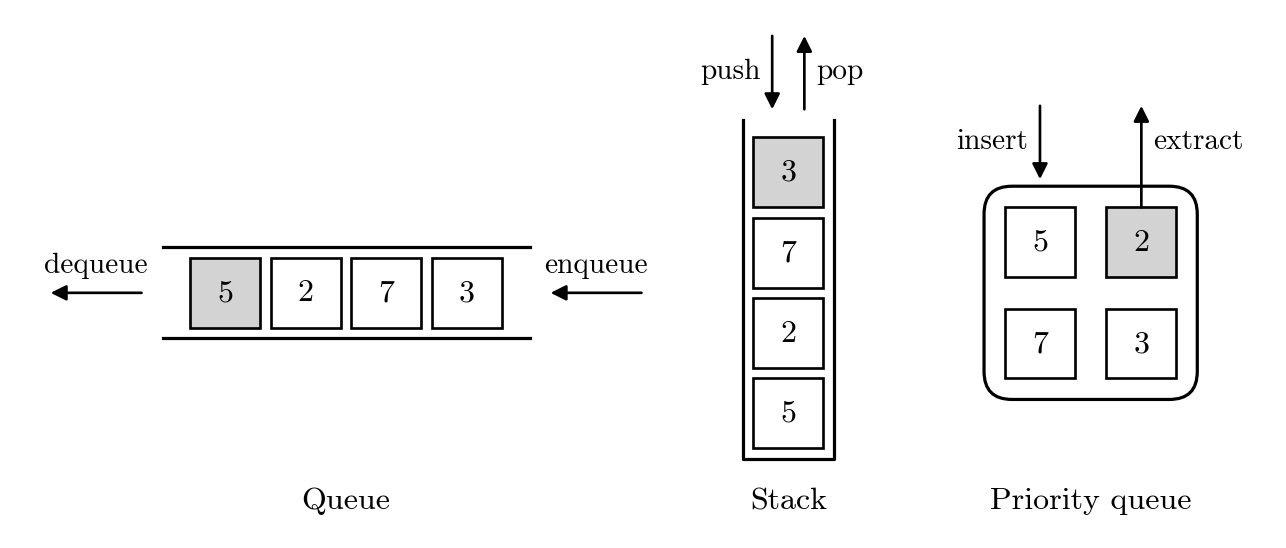
Three diagrams side by side, labeled Queue, Stack, and Priority queue. In the queue, four boxes with 5, 2, 7, and 3 from left to right lie between two horizontal lines that are open at both ends, and the box with 5 is gray. An arrow labeled enqueue points into the right end, and an arrow labeled dequeue points out of the left end. In the stack, four boxes with 5, 2, 7, and 3 from bottom to top lie in a container that is open at the top, and the box with 3 is gray. Above the opening, an arrow labeled push points down, and an arrow labeled pop points up. In the priority queue, four boxes lie in a rounded rectangle, with 5 and 2 in the top row and 7 and 3 in the bottom row, and the box with 2 is gray. An arrow labeled insert points down into the rectangle, and an arrow labeled extract points up from the box with 2 out of the rectangle.
Figure 7.1: Queue, stack, and priority queue after the numbers 5, 2, 7, and 3 are added in this order. The number in the gray box is taken out next: the number added first from the queue, the number added last from the stack, and the smallest number from the priority queue, which uses each number as its key.

In Python, these data structures are available as queue.Queue, queue.LifoQueue, and queue.PriorityQueue.

Example 7.1 (Queue, stack, and priority queue in Python) The three classes have the same methods: put adds an element, and get takes one out. The following code adds the numbers 5, 2, 7, and 3 in this order to a queue, as in Figure 7.1, and then takes all of them out.

from queue import Queue

queue = Queue()
queue.put(5)
queue.put(2)
queue.put(7)
queue.put(3)
print(queue.get())
print(queue.get())
print(queue.get())
print(queue.get())
5
2
7
3

The queue takes the numbers out in the order they were added. The same code with a stack takes them out in the reverse order.

from queue import LifoQueue

stack = LifoQueue()
stack.put(5)
stack.put(2)
stack.put(7)
stack.put(3)
print(stack.get())
print(stack.get())
print(stack.get())
print(stack.get())
3
7
2
5

With a priority queue, each number is used as its own key, so the numbers are taken out in increasing order.

from queue import PriorityQueue

priority_queue = PriorityQueue()
priority_queue.put(5)
priority_queue.put(2)
priority_queue.put(7)
priority_queue.put(3)
print(priority_queue.get())
2
3
5
7

In each case, the first one taken out corresponds to the gray box in Figure 7.1.

NoteThe queue module and other Python containers

The queue module is designed for passing data between threads, so its classes use a lock in every put and get. We use them because the three classes have the same methods. Programs with a single thread usually use collections.deque as a queue, a list as a stack, and the heapq module for a priority queue, which are faster. Note also that an empty Queue is not false in an if or while condition: while queue: never stops, so write while not queue.empty():.

7.5 Summary

  • A queue takes out the element added first, a stack takes out the element added last, and a priority queue takes out the element with the smallest or largest key.
  • Breadth-first search uses a queue and explores the vertices closer to the start vertex first.
  • Depth-first search uses a stack, goes as far as it can, and then goes back.
  • Besides using a queue or a stack, breadth-first search and depth-first search differ in when a vertex is marked as visited: when it is added or when it is taken out.

7.6 Exercises

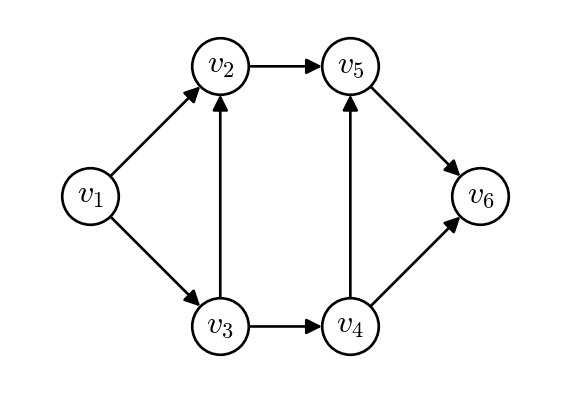
Exercise 7.1 (Visiting order by hand) Consider the directed graph in Figure 7.3. Process the successors of each vertex in increasing order of their subscripts.

  1. Apply Algorithm 1 with start vertex v_1. Show the queue Q as in Table 7.1, and give the order in which the vertices are visited.
  2. Apply Algorithm 2 with start vertex v_1. Show the stack L as in Table 7.2, and give the order in which the vertices are visited. Which vertex is pushed more than once?
  3. Check your answers with bfs() and dfs().