ボックスモデル(box model)は、HTML要素のレイアウトを理解するための基本的な概念です。すべてのHTML要素は、ボックスとして表現され、以下の4つの部分で構成されています。
コンテンツ(content): 実際の内容が表示される領域。
パディング(padding): コンテンツとボーダーの間のスペース。
ボーダー(border): パディングとマージンの間にある線。
マージン(margin): ボックスの外側のスペース。
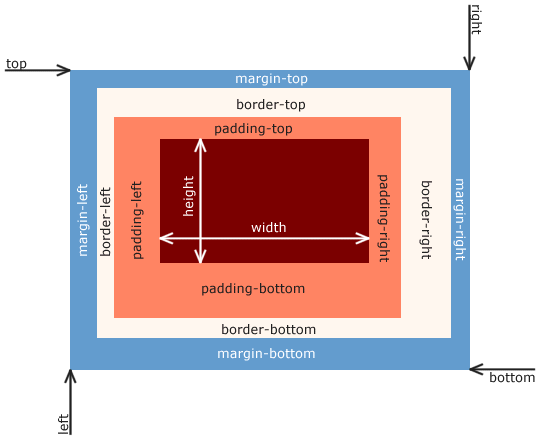
CSSボックスモデル,CC BY-SA 3.0
ボーダー
border-styleはボーダーのスタイルを指定するプロパティです。よく使われる値は以下の通りです。
none: ボーダーなしsolid: 実線dashed: 破線dotted: 点線
border-widthはボーダーの太さを指定するプロパティです。
thin: 細いボーダーmedium: 通常のボーダーthick: 太いボーダーpx: ピクセル単位で指定(例:2px)
border-colorはボーダーの色を指定するプロパティです。色は名前、HEXコード、RGB値などで指定できます。
border-radiusはボーダーの角を丸くするためのプロパティです。値はピクセル単位で指定します。
以下の例では、ボーダーのスタイル、太さ、色と角の丸みを指定しています。
/* style.css */
#box {
    border-style: solid; /* ボーダーのスタイル */
    border-width: 2px; /* ボーダーの太さ */
    border-color: blue; /* ボーダーの色 */
    border-radius: 10px; /* ボーダーの角を丸くする */
}
<!-- index.html -->
<p>The box below has a solid blue border with a width of 2 pixels and rounded corners.</p>
<div id="box" style="width: 200px; height: 100px;">
This is a box with a solid blue border.
</div>マージン
marginは、ボーダーの外側,要素間のスペースを指定するプロパティです。
marginは、以下のように指定できます。
/* style.css */
#box {
    /* マージンの指定 */
    margin: 20px;

    /* ボーダーの指定 */
    border-style: solid;
    border-width: 2px;
}
<!-- index.html -->
<p>The box below has a margin of 20 pixels.</p>
<div id="box" style="width: 200px; height: 100px;">
This is a box with a margin of 20 pixels.
</div>マージンは、個別に指定することもできます。例えば、margin-topは上のマージン,margin-rightは右のマージン,margin-bottomは下のマージン,margin-leftは左のマージンを指定します。
/* style.css */
#box {
    margin-top: 10px; /* 上のマージン */
    margin-right: 20px; /* 右のマージン */
    margin-bottom: 30px; /* 下のマージン */
    margin-left: 40px; /* 左のマージン */
}パディング
paddingは、コンテンツとボーダーの間のスペースを指定するプロパティです。
paddingは、以下のように指定できます。
/* style.css */
#box {
    /* パディングの指定 */
    padding: 20px;

    /* ボーダーの指定 */
    border-style: solid;
    border-width: 2px;
}
<!-- index.html -->
<p>The box below has a padding of 20 pixels.</p>
<div id="box" style="width: 200px; height: 100px;">
This is a box with a padding of 20 pixels.
</div>パディングも、個別に指定することができます。
padding-top: 上のパディングpadding-right: 右のパディングpadding-bottom: 下のパディングpadding-left: 左のパディング
/* style.css */
#box {
    padding-top: 10px; /* 上のパディング */
    padding-right: 20px; /* 右のパディング */
    padding-bottom: 30px; /* 下のパディング */
    padding-left: 40px; /* 左のパディング */
}ボックスサイズ
デフォルトでは、要素のwidthとheightは、コンテンツの幅と高さを指定します。
box-sizing: border-box;を指定すると、widthとheightにボーダーとパディングのサイズが含まれるようになります。
<!-- index.html -->
<!DOCTYPE html>
<html>
<head>
    <title>Box Model Example</title>
    <style>
        #box1 {
            width: 500px; /* 幅 */
            height: 50px; /* 高さ */
            background-color: lightblue; /* 背景色 */
            border-width: 0px; /* ボーダーの太さ */
            padding: 0px; /* パディング */
            margin: 0px; /* マージン */
        }
        #box2 {
            width: 500px; /* 幅 */
            height: 50px; /* 高さ */
            background-color: lightgreen; /* 背景色 */
            border: 2px solid red; /* ボーダーのスタイル */
            padding: 20px; /* パディング */
            margin: 0px; /* マージン */
        }
        #box3 {
            box-sizing: border-box; /* ボックスサイズをborder-boxに設定 */
            width: 500px; /* 幅 */
            height: 50px; /* 高さ */
            background-color: lightcoral; /* 背景色 */
            border: 2px solid blue; /* ボーダーのスタイル */
            padding: 20px; /* パディング */
            margin: 0px; /* マージン */
        }
    </style>
</head>
<body>
    <p>The boxs below demonstrate the box model.</p>
    <div id="box1">
        This is box 1.
    <div id="box2">
        This is box 2 with a border and padding.
    </div>
    <div id="box3">
        This is box 3 with box-sizing set to border-box.
    </div>
</body>
</html>ボックス全体のサイズはwidth + padding + borderで計算されます。
box1幅: 500
高さ: 50
box2:幅: 500 + 20 (左パディング) + 20 (右パディング) + 2 (左ボーダー) + 2 (右ボーダー) = 544
高さ: 50 + 20 (上パディング) + 20 (下パディング) + 2 (上ボーダー) + 2 (下ボーダー) = 94
box3:幅: 500
高さ: 50
box-sizing: border-box;を指定すると、要素の全体的なサイズを簡単に制御できるため,下記のようなコードがよく使われます。
* {
    box-sizing: border-box;
    padding: 0;
    margin: 0;
}ボックスモデルの例
<!-- index.html -->
<!DOCTYPE html>
<html>
<head>
    <title>Box Model Example</title>
    <style>
        #box {
            width: 200px; /* 幅 */
            height: 100px; /* 高さ */
            background-color: lightblue; /* 背景色 */
            border-style: solid; /* ボーダーのスタイル */
            border-width: 2px; /* ボーダーの太さ */
            border-color: blue; /* ボーダーの色 */
            border-radius: 10px; /* ボーダーの角を丸くする */
            padding: 20px; /* パディング */
            margin: 30px; /* マージン */
        }
    </style>
</head>
<body>
    <div id="box">
        This is a box with a solid blue border, padding of 20 pixels, and a margin of 30 pixels.
    </div>
</body>
</html>